
Table of Contents
Digital fatigue can make reading feel harder than it should. After a day of messages, browser tabs, video calls, social feeds, and notifications, opening another app on the same phone may not feel like a meaningful break.
A Kindle or another dedicated e-reader may help by removing many of the distractions built into smartphones and tablets. It provides one primary activity, a paper-like display, adjustable text, and long battery life. However, it is still an electronic device, not a treatment for fatigue, poor concentration, eye discomfort, or sleep problems.
This guide compares a Kindle with phone reading, tablets, paper books, and free library options. It also explains which Kindle model makes sense, whether Kindle Unlimited is worth the recurring cost, and when buying another device is unnecessary.
Affiliate disclosure: MindReset.org may earn a commission if you buy through our links. This does not increase your price and does not affect our editorial judgment.
As an Amazon Associate, we earn from qualifying purchases.
Research note: We have not personally tested every Kindle model, reading environment, Kindle Unlimited title, or long-term routine discussed here. This guide is based on current manufacturer documentation, official U.S. health guidance, publicly available product information, and comparison between reading formats.
What we assessed: distraction potential, display type, portability, evening usability, note-taking, subscription requirements, ownership of books, hidden costs, and fit for different reading habits.
What we could not independently verify: long-term comfort for every reader, individual eye-strain outcomes, battery degradation, software reliability over several years, customer-support quality, or whether switching to a Kindle improves concentration or sleep. Prices, specifications, promotions, Kindle generations, catalogue access, and warranty terms may change.
Health note: Digital fatigue is an informal term rather than one specific medical diagnosis. Persistent headaches, blurred vision, dry eyes, severe tiredness, concentration problems, or sleep disruption should not automatically be blamed on screens. Consider professional advice when symptoms are persistent, worsening, or interfering with daily life.

Quick Verdict
A Kindle may be worth buying if most of your reading currently happens on a phone and notifications, social media, messages, or unrelated apps repeatedly interrupt you.
The basic Kindle is the best entry point for readers who want a compact, lower-cost device and do not need waterproofing or adjustable warm light.
Kindle Paperwhite is the best overall option for frequent readers. Its larger display, adjustable warm light, waterproof design, and longer stated battery life make it more flexible for travel and evening use.
Kindle Scribe is best for large-format reading and handwritten notes, but it is heavier, substantially more expensive, and unnecessary for ordinary novels.
Skip buying a Kindle if you already read comfortably on paper, rarely finish books, mainly need color textbooks or complex PDFs, or can solve the distraction problem by using airplane mode and notification controls on a device you already own.
Kindle Unlimited is optional. A Kindle works without the subscription. Buy individual ebooks or borrow compatible library books when that better matches your reading volume.
Digital Fatigue Buyer Decision Table
| Your situation | Best option | Why | Skip if |
|---|---|---|---|
| Phone notifications constantly interrupt reading | Basic Kindle or Paperwhite | A dedicated reader removes most unrelated apps and alerts | You can reliably use airplane mode and app blocking |
| You want the lowest-cost screen-free option | Paper books or library books | No device, charging, software, or subscription required | Storage space and carrying several books are problems |
| You read frequently in the evening | Kindle Paperwhite | Larger display and adjustable warm light offer more control | Any illuminated device makes your bedtime routine worse |
| You annotate documents and keep handwritten notebooks | Kindle Scribe | Large display and pen support combine reading with notes | You mainly read novels and rarely write |
| You read only occasionally | Kindle app or public library | A new device may not justify its cost | Phone distractions prevent you from finishing books |
| You want access to many books each month | Kindle Unlimited | One subscription covers a large eligible catalogue | The authors or titles you want are not included |
What Does Digital Fatigue Actually Mean?
Digital fatigue is commonly used as an umbrella term for discomfort or overload associated with prolonged technology use. It may include tired or dry eyes, headaches, difficulty concentrating, mental fragmentation, neck discomfort, irritability, or simply feeling unable to absorb more information.
These experiences do not all have the same cause. Possible contributors include:
- long periods of close visual focus;
- reduced blinking while looking at a display;
- glare, poor lighting, or unsuitable text size;
- frequent notifications and task switching;
- poor posture or an uncomfortable reading position;
- working without adequate breaks;
- late-night content that delays bedtime;
- general tiredness unrelated to the device itself.
The American Academy of Ophthalmology notes that prolonged device use can be associated with blurred vision, dry or uncomfortable eyes, and headaches. Its practical recommendations focus on suitable brightness, viewing distance, blinking, and regular breaks rather than treating blue light as the only cause.
Constant switching between messages, feeds, email, and reading may create a different kind of fatigue. The American Psychological Association explains that switching between tasks creates small cognitive costs, especially when activities are complex or unfamiliar.
A Kindle cannot remove every source of fatigue. Its main advantage is narrower: it may make one activity easier to protect from unrelated digital demands.
Why Reading on a Phone Can Feel More Distracting
A smartphone combines reading with communication, shopping, work, navigation, entertainment, news, banking, and social media. Even when notifications are disabled, the other apps remain one swipe away.
This creates several practical problems:
- You may enter the device to read and leave through email or social media.
- Incoming notifications interrupt the paragraph and the reading intention.
- A bright, glossy display may feel uncomfortable in some lighting conditions.
- A narrow phone screen can require frequent page changes and shorter lines.
- Reading becomes mixed with browsing, messages, and recommendations.
A dedicated Kindle does not contain the usual social media apps, messaging feeds, video platforms, or work notifications. That does not make it biologically restorative, but it can make leaving the book less convenient.
Before buying another device, test a no-cost version of the same idea: activate airplane mode, disable notifications, move distracting apps away from the home screen, and read in full-screen mode for one week.
Our guide to digital detox tools for focus compares additional ways to add friction without depending entirely on willpower.
Kindle vs Phone vs Tablet vs Paper Book
| Reading format | Main advantage | Main limitation | Best for |
|---|---|---|---|
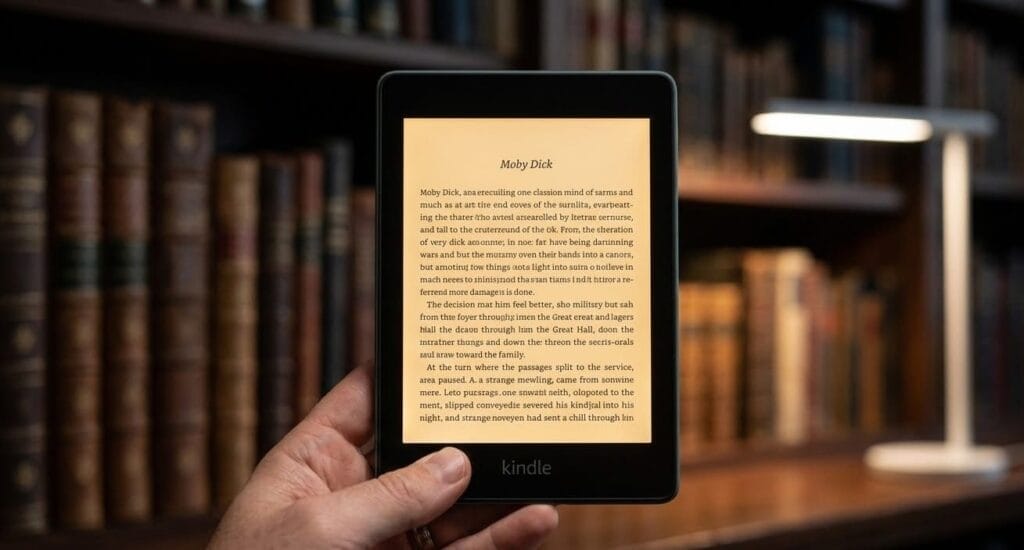
| Kindle e-reader | Low-distraction interface, glare-free display, adjustable text, long battery life | Upfront cost, monochrome limitations on many models, another device to charge | Frequent novel and nonfiction readers |
| Smartphone | No additional purchase and always available | Notifications, small screen, app switching, glossy display | Occasional reading and short sessions |
| Tablet | Large color display suitable for magazines, textbooks, and PDFs | More distractions, heavier, shorter battery life, reflective screen | Color content and complex layouts |
| Paper book | No notifications, charging, software, or illuminated display | Physical storage, weight, fixed text size, poor portability across several books | Readers who want the simplest offline experience |
| Kindle app in airplane mode | Free way to test focused digital reading | The rest of the phone remains available when airplane mode ends | Testing the routine before buying hardware |
Who Should Buy a Kindle for Digital Fatigue?
- You want to read more but repeatedly leave the book to check another app.
- You carry several books or travel frequently.
- You benefit from adjustable font size, boldness, spacing, or margins.
- You read outside and want a glare-free display.
- You want weeks of stated battery life rather than daily charging.
- You already buy ebooks or regularly borrow compatible library ebooks.
- You want one device reserved primarily for books.
Who Should Avoid Buying One?
- You rarely finish books regardless of format.
- You mainly read color textbooks, comics, magazines, or visually complex PDFs.
- You already read comfortably on paper and do not need portability.
- Your fatigue comes primarily from work hours, poor sleep, headaches, or an unsuitable prescription rather than reading distractions.
- You expect an e-reader to repair attention, improve mental health, or solve a persistent sleep problem.
- You do not want to manage another account, charging cable, case, or digital library.
- You can create a satisfactory reading mode on a phone or tablet you already own.
Basic Kindle: Best Low-Cost Entry Point
The basic Kindle is the simplest way to separate reading from smartphone distractions. Amazon’s current U.S. comparison lists a 6-inch glare-free display, 300 ppi resolution, 16 GB of storage, and stated battery life of up to six weeks.
Its smaller size makes it easier to hold and pack than the larger models. For ordinary novels, most users do not need extensive storage because text-based ebooks use relatively little space.
Buy the basic Kindle if:
- You want the lowest-cost dedicated Kindle.
- Compact size and low weight matter more than a larger screen.
- You mostly read standard ebooks rather than large PDFs.
- You do not need waterproofing or adjustable warm light.
Skip the basic Kindle if:
- You regularly read beside a pool or in a bath.
- You want a larger screen and fewer page turns.
- Adjustable warm light is important for evening reading.
- You want handwriting or document annotation.
Kindle Paperwhite: Best Overall for Frequent Readers
The Kindle Paperwhite is the strongest middle-ground option for readers who expect to use the device regularly. Amazon’s current U.S. model has a 7-inch glare-free display, 300 ppi resolution, adjustable warm light, waterproof construction, and stated battery life of up to 12 weeks.
The warm-light control changes the display from a cooler white appearance toward amber. This may feel more comfortable in a dim room, but it should not be described as completely preventing melatonin effects or guaranteeing better sleep.
The CDC recommends turning off electronic devices at least 30 minutes before bedtime as a general sleep habit. A Paperwhite remains an electronic device, even though its display and limited app environment differ from a phone or tablet.
See the CDC guidance on better sleep habits.
Buy the Paperwhite if:
- You read several times per week.
- You want a larger screen without moving to a note-taking tablet.
- You value adjustable warm light.
- You want waterproofing for travel, poolside, or bath reading.
- You want the longest stated battery life among the standard reading-focused options.
Skip the Paperwhite if:
- The basic Kindle already covers your reading needs.
- You strongly prefer the smallest and lightest device.
- You need color content or advanced PDF handling.
- You want handwritten notebooks and a pen.
Kindle Scribe: Best for Reading and Handwritten Notes
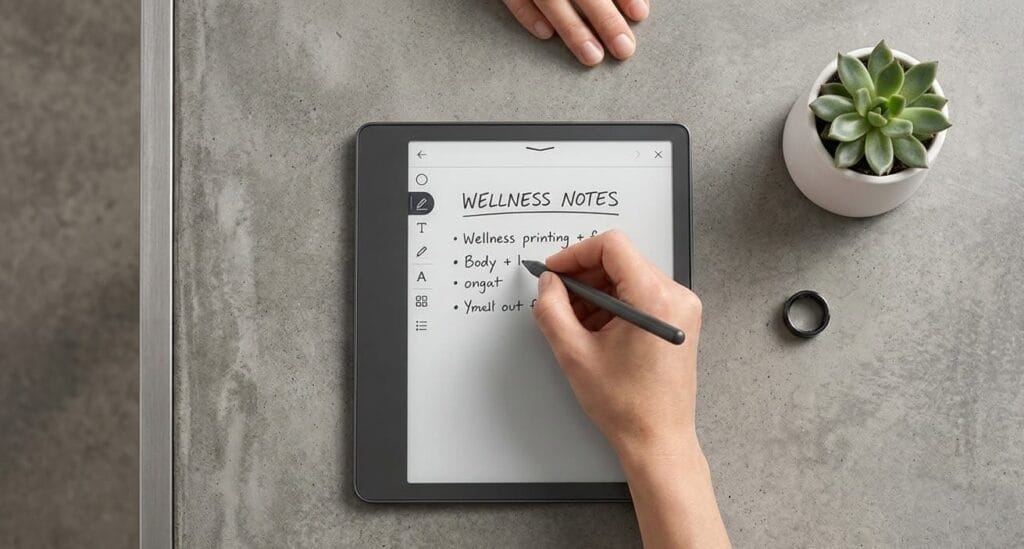
Kindle Scribe combines a large paper-like display with pen input. It is designed for reading, handwritten notebooks, document review, and writing inside supported books and files.
This can be useful for study notes, project planning, meeting notes, document annotation, or reflective writing. It should not be presented as therapy, a method for treating depression, or a tool that restores neuroplasticity.
Amazon is currently selling more than one Scribe generation and configuration. Check the exact display size, storage, included pen, software features, and model year before purchasing rather than assuming that every listing describes the same device.
Buy the Scribe if:
- You want one device for ebooks, notebooks, and supported documents.
- A large display is more important than pocket portability.
- You regularly annotate, outline, plan, or write by hand.
- You can justify the higher cost through frequent use.
Skip the Scribe if:
- You mainly read ordinary novels.
- You want a light device for one-handed reading.
- You need a full tablet app ecosystem.
- You expect advanced desktop-level PDF editing.
- You are buying it only because journaling is currently fashionable.
Is Kindle Unlimited Worth It?
Kindle Unlimited is a separate subscription rather than a requirement for using a Kindle. In the United States, Amazon currently lists the service at $11.99 per month before applicable taxes, with access to more than four million eligible digital titles plus selected audiobooks, comics, manga, and magazines.
The word “unlimited” refers to reading within the eligible catalogue, not ownership of every title. You borrow included books and lose access when the membership ends. Books purchased separately remain in your account.
Kindle Unlimited may be worth it if:
- You read multiple eligible books each month.
- You enjoy experimenting with unfamiliar authors and genres.
- The books you already want are included in the current catalogue.
- You use both ebooks and included audiobooks.
- You understand that catalogue availability can change.
Skip Kindle Unlimited if:
- You read fewer than one or two books in a typical month.
- Your preferred authors or publishers are rarely included.
- You want permanent ownership of every ebook.
- Your public library already provides enough compatible ebooks.
- You frequently forget to cancel subscriptions you are no longer using.
Simple value test: Before subscribing, search the current Kindle Unlimited catalogue for ten books you genuinely intend to read. Do not subscribe only because the total library sounds large.
Hidden Costs and Limitations
The device is only the first cost
A protective cover, wall adapter, screen protector, replacement pen tips, extended warranty, or larger storage configuration may increase the final cost. Do not buy every accessory before learning how and where you actually read.
Some configurations may include lock-screen advertising
Check whether the selected Kindle is sold with lock-screen ads or without ads. An ad-free configuration may cost more, and options can vary by model and promotion.
Kindle Unlimited renews automatically
Trials and promotional periods normally convert into paid membership unless cancelled under the applicable terms. Record the renewal date and current recurring price before joining.
Not every Kindle book is included
Popular books may still require a separate purchase. Kindle Unlimited value depends on the specific catalogue, not the total number of available titles.
PDF handling has limits
Small Kindles are primarily designed for reflowable ebooks. Large academic PDFs, detailed diagrams, spreadsheets, and complex fixed layouts may be easier to use on a tablet or computer.
An e-reader is still screen time
E-ink changes the display experience and reduces access to unrelated apps, but long sessions can still involve close focus, poor posture, dry eyes, and delayed bedtime. Continue taking breaks and adjust the font, brightness, and reading position.
Regional availability varies
Device models, Kindle Unlimited catalogues, library compatibility, warranties, prices, and promotions differ between the United States, United Kingdom, and other regions. Confirm the market shown at checkout.
How to Use a Kindle Without Creating Another Digital Habit
- Choose the book before the session. Avoid spending the entire reading period browsing recommendations.
- Set a realistic reading block. Start with 15–30 minutes instead of creating a demanding daily target.
- Adjust text rather than straining. Increase font size, boldness, spacing, or margins when needed.
- Match brightness to the room. The display should not look dramatically brighter than the surrounding environment.
- Look away regularly. Change focus distance, blink, stand up, and adjust posture during longer sessions.
- Use airplane mode when practical. Download the book first and remove unnecessary connectivity.
- Keep the phone elsewhere. A Kindle does not reduce distraction if the phone remains beside it with notifications active.
- Stop when reading becomes effortful. More pages are not always better when your eyes or attention are already tired.
For evening use, combine reading with a broader wind-down routine rather than expecting one device to act as a guaranteed sleep signal.
What We Could Verify
- Current Kindle e-readers use glare-free, paper-like displays designed primarily for reading.
- The current basic Kindle has a 6-inch display, while the current Paperwhite has a 7-inch display.
- Paperwhite includes adjustable warm light and waterproof construction.
- Kindle Scribe supports handwritten notes with an included pen on current configurations.
- Kindle Unlimited is optional and separate from the purchase of a Kindle.
- Kindle Unlimited members borrow eligible titles and lose access to them when membership ends.
- Prolonged digital-device use may be associated with dry eyes, blurred vision, headaches, and other temporary discomfort.
- Switching repeatedly between tasks can create cognitive costs.
What We Could Not Verify
- That a Kindle cures or reverses digital fatigue.
- That deep reading restores damaged neural connections.
- That Kindle Paperwhite’s warm light has no effect on melatonin or guarantees better sleep.
- That Kindle Scribe journaling treats depression or restores neuroplasticity.
- That reading on E-ink prevents eye strain for every user.
- That a dedicated e-reader automatically improves focus, productivity, calm, or mental wellbeing.
- Long-term app stability, battery condition, durability, and customer-support quality for every device.
Alternatives to Buying a Kindle
Use the Kindle app in airplane mode
This is the best free test. Download a book, activate airplane mode or Do Not Disturb, hide unrelated apps, and complete several reading sessions before buying hardware.
Borrow paper books
A public library offers a genuinely screen-free reading experience without a device purchase or recurring ebook subscription.
Borrow compatible library ebooks
Many U.S. libraries allow eligible ebooks to be delivered to a Kindle. Availability depends on the library, publisher, title, and region.
Use a tablet for visual content
A tablet may be better for color textbooks, magazines, comics, diagrams, large PDFs, and documents requiring frequent zooming.
Fix the environment first
Better lighting, a larger font, a comfortable chair, notification limits, regular breaks, and keeping the phone outside reach may provide more benefit than changing devices.
Frequently Asked Questions
Can a Kindle reduce digital fatigue?
It may reduce distraction by removing social media, messages, video apps, and most notifications from the reading environment. It does not eliminate every possible cause of eye discomfort, tiredness, poor concentration, or sleep disruption.
Is a Kindle better for the eyes than a phone?
Some readers find a glare-free E-ink display more comfortable than a glossy phone screen, especially outdoors. Comfort still depends on text size, brightness, lighting, blinking, viewing distance, posture, breaks, and individual eye health.
Does a Kindle emit blue light?
Kindles with front lighting still emit light. Paperwhite allows the display appearance to shift toward warmer amber tones, but that does not make evening use biologically neutral or guarantee improved sleep.
Do I need Kindle Unlimited to use a Kindle?
No. You can purchase individual ebooks, send supported personal documents, use eligible library borrowing, or access other content associated with your Amazon account.
Do I keep Kindle Unlimited books after cancelling?
No. Kindle Unlimited titles are borrowed through the active membership. After the membership period ends, access to borrowed titles is removed. Ebooks purchased separately remain in your account.
Which Kindle is best for ordinary reading?
The basic Kindle is sufficient for budget-conscious readers who want a compact device. Paperwhite is the stronger all-round choice for frequent readers who value a larger screen, warm-light adjustment, waterproofing, and longer stated battery life.
Is Kindle Scribe worth the higher price?
It may be worth it when you will regularly use the large display, handwritten notebooks, pen, and document features. It is poor value when you mainly read novels and rarely take notes.
Should I read on a Kindle before bed?
That depends on your response to evening reading. Keep brightness low, use a timer, and stop if the device delays sleep. The CDC recommends turning off electronic devices at least 30 minutes before bedtime as a general sleep habit.
Final Verdict
A Kindle can be a practical tool for digital fatigue when the real problem is fragmented reading. Its value comes from reducing access to notifications, social media, messages, and unrelated apps—not from repairing the nervous system or creating a guaranteed neurological reset.
Choose the basic Kindle when price, portability, and ordinary ebook reading matter most.
Choose Kindle Paperwhite when you read frequently and want a larger display, warm-light adjustment, waterproofing, and longer stated battery life.
Choose Kindle Scribe only when handwritten notebooks, document annotation, and a large display justify the additional price and weight.
Choose Kindle Unlimited only after confirming that its current catalogue includes enough books you genuinely want to read.
Skip the purchase when airplane mode, paper books, library borrowing, a larger font, or better screen habits already solve the problem.
The best reading tool is not the device with the longest feature list. It is the one that helps you begin a book, remain with it, and stop when your attention needs a break.
Sources and Further Reading
- American Academy of Ophthalmology: Computers, Digital Devices, and Eye Strain
- American Psychological Association: Multitasking and Switching Costs
- U.S. Centers for Disease Control and Prevention: About Sleep
- Amazon Help: Identify Your Kindle E-Reader
- Amazon Help: Kindle E-Reader User and Quick Start Guides
- Amazon Help: Learn About Kindle Unlimited
- Amazon Help: Cancel Your Kindle Unlimited Subscription